
One static address you can post anywhere, and every payment to it lands on a fresh, unlinkable Taproot output. No notification transaction, no third-party server: your own node does the scanning.
🧪 Experimental. Silent payments (BIP352) are new in Fully Noded and FN-Server. Test with small amounts first.
What you need
- Fully Noded with a signer (your seed) and a wallet made from it.
- FN-Server (v0.3.0 or newer) on a Mac, running Bitcoin Core 25 or newer.
- Your node needs the blocks from the height you start scanning at. A pruned node works as long as it still has them (FN-Server’s Earliest available button fills in the oldest block it can scan).
- Face ID / Touch ID or an app lock password in Fully Noded (Settings → Security Center): exporting the scan key asks for it.
1. Get your silent payment address
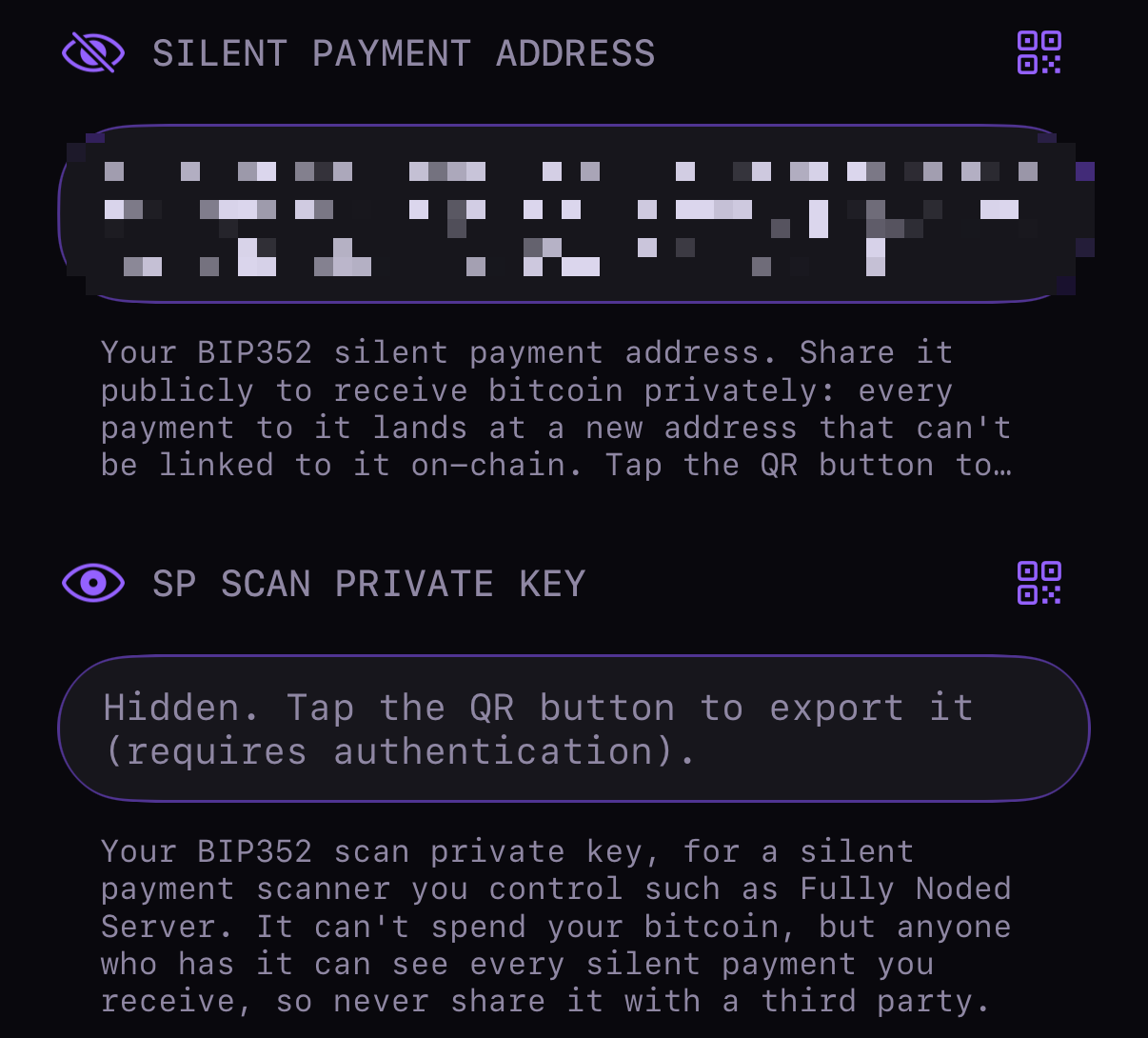
In Fully Noded open your wallet’s details and scroll to Silent payments, or open the Signers tab, tap your signer and scroll to Silent Payment Address. That sp1… address (tsp1… on test networks) is yours to share: on a website, a donation page, an invoice or your Nostr profile. Tap the QR button to show it as a QR code. You can also show it from the Receive screen: choose Silent payment instead of Address.
2. Export the FN-Server link
In the wallet’s Silent payments section tap FN-SERVER LINK. After Face ID / Touch ID or your app password, Fully Noded shows one QR code (and a link you can copy) holding your silent payment address, your scan private key and the wallet’s name on your node: everything FN-Server needs, in one step.
From a signer instead, tap the QR button next to SP Scan Private Key and choose Fully Noded Server QR (or Scan key only). Your address and scan key are saved on the signer, so this keeps working even if you later delete its seed words.
The scan key can’t spend, but anyone who has it can see every silent payment you receive. Only give it to a scanner you control, like your own FN-Server. Your spend key never leaves Fully Noded.
3. Start scanning in FN-Server
In FN-Server, click Silent Payments in the sidebar (or, on the Bitcoin Core tab, the utilities (wrench) button, then Silent Payments).

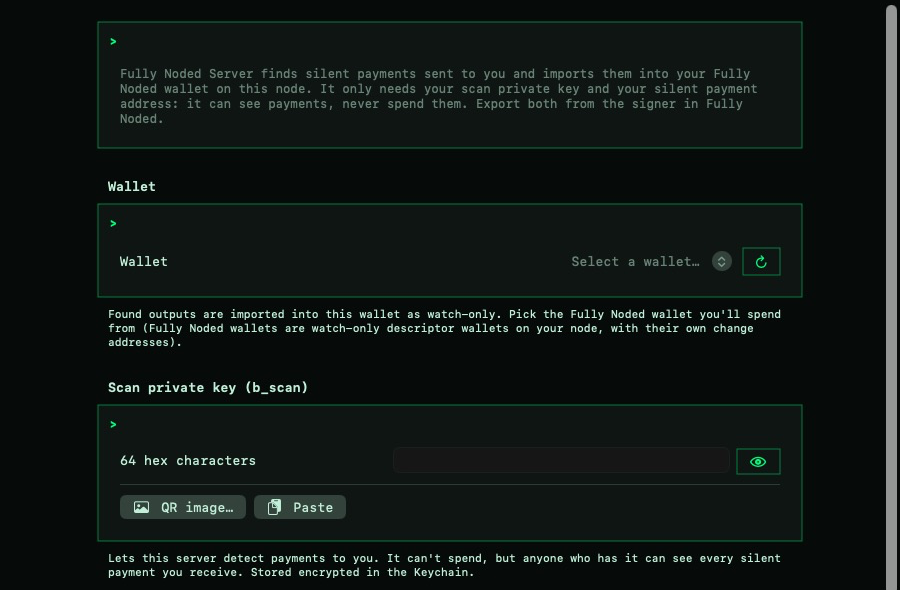
- Import from Fully Noded: Paste link (tap Copy Text in Fully Noded; Universal Clipboard brings it to your Mac), QR image… or Scan QR (if your Mac has a camera). This fills in the wallet, scan key and address. If you saved the QR as an image, delete it afterwards and make sure it didn’t sync to a cloud photo library. FN-Server stores the key encrypted in your Mac’s Keychain.
- Network: check it’s the network your wallet is on (Mainnet, Testnet, Signet…). It’s separate from the Bitcoin Core network picker.
- Wallet: the Fully Noded wallet you’ll spend from (filled in by the link). It must be a watch-only descriptor wallet, which Fully Noded wallets are.
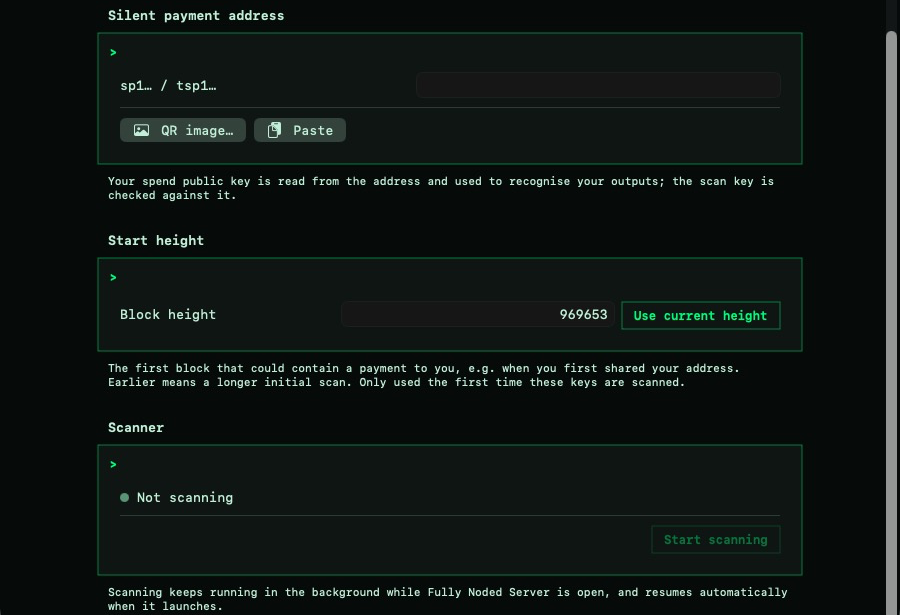
- Scan private key and silent payment address: filled in by the link, or enter them one by one with Scan QR, QR image… or Paste. FN-Server checks that they match each other and the network, so a wrong key is caught before scanning starts. Copy address and Show QR let you share your address from the Mac too.
- Start height: the first block that could contain a payment to you. For a brand-new address, use Use current height; Earliest available goes as far back as your node allows. Scanning from an old height on mainnet takes a while, though FN-Server fetches ahead and checks each block’s transactions in parallel.
- Click Start scanning.
FN-Server then follows the chain block by block with your own node. The icon next to Silent Payments in the sidebar shows the scanner’s state: a filling ring while it catches up, a check mark when it’s up to date, a warning if it’s retrying. Scanning only runs while FN-Server is open, and it catches up when you relaunch it. Rescan scans again from an earlier block, and Check a transaction tells you whether a given transaction pays you, and if not, why.
4. Receive
Anyone with a BIP352 wallet can pay your sp1… address. When FN-Server finds a payment it shows a card with the amount, imports it into your wallet as a watch-only Taproot output and rescans once it’s caught up, so the balance shows up in Fully Noded like any other coin. History in FN-Server lists every silent payment imported so far.
5. Spend
Spend from that wallet in Fully Noded as usual. The transaction verifier recognises silent payment inputs and signs them with your spend key on the device. When you spend silent payment outputs, Fully Noded asks where change should go: back to your own silent payment address, or the wallet’s normal change address.
On the UTXOs screen, silent payment outputs are marked. Check SP info proves one is yours and saves its tweak on your device; after that you can also sweep it without your node (Sweep without node, over Tor).
To pay someone else’s silent payment address, just paste their sp1… address (or a payment request with sp=) in the send view. Send all works too.
How it works, briefly
- Your address is two public keys, a scan key and a spend key, both derived from your seed.
- A sender combines the private keys of the coins they’re spending with your scan key to make a shared secret, which turns your spend key into a one-time Taproot output only you can link to you.
- Your node recomputes that secret for each new transaction using your scan private key and checks whether any output is yours.
- Spending uses your spend key plus that output’s tweak, so only the device with your seed can sign.
Current limits: one silent payment recipient per transaction, only the change label is supported, and scanning needs FN-Server (Fully Noded doesn’t scan by itself). Full technical details: SilentPayments.md.

