
Most mobile wallets are powered by someone else’s server. Every balance check and every transaction you broadcast tells that server which addresses are yours, and they can switch you off whenever they like. Fully Noded is built on a different idea: your wallet should talk only to your own node.
The big picture
[ Fully Noded ]  --Tor-->  [ onion service ]  -->  [ Bitcoin Core RPC ]
   iPhone/Mac               on your Mac (FN-Server)     on your Mac

[ Fully Noded ]  --encrypted nostr events-->  [ relay ]  -->  [ FN-Server ]  -->  [ Bitcoin Core RPC ]
iPhone/Mac (Nostr Connect)- Bitcoin Core (or Knots) is the node. It validates every block and transaction itself and holds your watch-only wallets.
- FN-Server installs, verifies, configures and supervises the node, Tor and Join Market on your Mac.
- Fully Noded is the remote control and the signer. It sends commands to your node and signs transactions on your device.
Talking to your node: RPC
Bitcoin Core has a huge amount of functionality that its GUI never shows. It’s all reachable over a JSON-RPC interface, the same commands you’d type into bitcoin-cli. Fully Noded turns your taps into those calls. For example, opening a wallet’s transaction list sends something equivalent to:
curl --data-binary '{"jsonrpc":"1.0","id":"fn","method":"listtransactions","params":["*",50,0,true]}' \
  -H 'content-type: text/plain;' http://USER:PASS@yournode.onion:8332/
There’s no Electrum server, no indexer and no company API in between. Anything you can do with bitcoin-cli is possible in principle, and the dashboard lets you tap any tile to see the raw RPC response.
Reaching it from anywhere: Tor
FN-Server embeds Tor and automatically creates v3 onion services for your node’s RPC port. Fully Noded embeds Tor too, so the connection runs end to end inside the Tor network:
- No port forwarding and no dynamic DNS: it works behind any router or NAT.
- Your phone’s IP is never revealed to your node’s network, and your node’s IP is never revealed to your phone’s network.
- Traffic is encrypted by Tor. You can add Tor v3 client authentication so that only your device can even reach the onion service.
- While your active node is an onion service, Fully Noded’s Tor connects only to onion services, so nothing in the app can reach the clearnet.
- Your node, exchange rates and payjoin each get their own Tor circuit, and every request carries the same generic browser header.
On the same LAN you can connect directly to localhost or a local IP instead, optionally pinning your node’s SSL certificate.
Or the fast way: Nostr Connect
Tor is private but building a circuit takes a while. Nostr Connect reaches the same node in about a second: Fully Noded sends each RPC call as an end-to-end encrypted nostr event (NIP-44), FN-Server picks it up from a relay, passes it to Bitcoin Core on your Mac and sends the encrypted answer back.
- Your RPC is never exposed. A relay only sees that two keys exchanged messages and when, never what they said. Events are ephemeral, so relays don’t store them.
- Only paired phones. FN-Server gives each phone its own key in a one-time pairing QR. Remove a pairing and that phone is cut off for good.
- Any network. Use FN-Server’s own relay at home or over a VPN like Tailscale (with TLS and a pinned certificate), Tailscale Funnel to reach it from anywhere, and public relays as a fallback.
- Plasma too. Plasma talks to FN-Server’s Core Lightning node the same way.
Credentials: rpcauth, not plaintext
When you add a node manually, Fully Noded generates a random password and gives you an rpcauth= line for bitcoin.conf. That line contains only a salted hash of the password, so your node’s config file never stores the password itself. Quick Connect packs the same details into a btcrpc://user:pass@host.onion:port URI shown as a QR code, which is why that QR must be kept private.
FN-Server keeps its own RPC credentials encrypted on disk using a key held in your Mac’s Keychain, and only uses them locally.
Keys stay with you
Your node holds watch-only wallets built from output descriptors, so it can track balances and build transactions but can’t spend. Private keys live in Fully Noded’s Signers: BIP39 seeds are double-encrypted on your device. Fully Noded asks the node to create an unsigned PSBT, signs it locally (no internet needed for signing), and sends the signed transaction back to your node to broadcast. Because everything is descriptor-based, multisig, miniscript, Taproot and hardware-wallet setups all work the same way.
What FN-Server does on your Mac
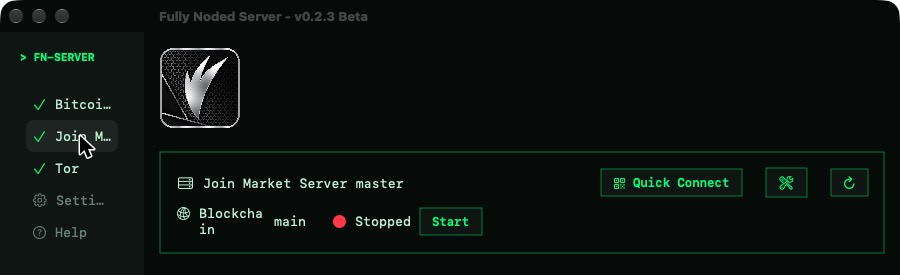
- Verified installs: downloads Bitcoin Core from bitcoincore.org, checks SHA256 sums and offers one-click GPG verification of the release signatures.
- Sensible defaults: binaries live in
~/.fullynoded, and Bitcoin’s data directory stays where it always is, so FN-Server works alongside an existing node. - Join Market: installs from the official repo, creates a dedicated wallet in Core and configures
jmwalletdso FN-JoinMarket can coinjoin through your node. - Multiple networks: run mainnet, testnet, signet and regtest side by side.
- Setup Assistant: walks you through checking your Mac, choosing Core or Knots and a network, installing, starting and connecting your wallets.
- Core Lightning: optional, installed with Homebrew, configured for your node and paired with Plasma by QR.
- Nostr Connect: runs a relay on your Mac and the bridge between nostr and your node.
- Silent payments: scans each new block with your scan key and imports payments to your silent payment address into your wallet.
- Low profile: it checks service heartbeats while the window is open. When you close it, it drops to a minimal menu bar app that does nothing until you click.
Why it matters
- Privacy: no third party learns your addresses, balances or IP.
- Sovereignty: your node enforces the rules you choose to run.
- Censorship resistance: there’s no server that can be shut down, pressured or told to drop you.
Everything is open source, so don’t trust, verify: Fully Noded · FN-Server. Ready to set it up? Start here.

